SONATA Service Order Management Service
SONATA is the heart of ETSI HypO; this microservice uses Business Process Model and Notation (BPMN) workflow diagrams to encode the lifecycle of a service order based on the TMF service order lifecycle diagram.
SONATA leverages the Kogito Business Automation library by RedHat to encode service orders into BPMN processes following the service order state machine suggested by TMF as shown in Figure 1.
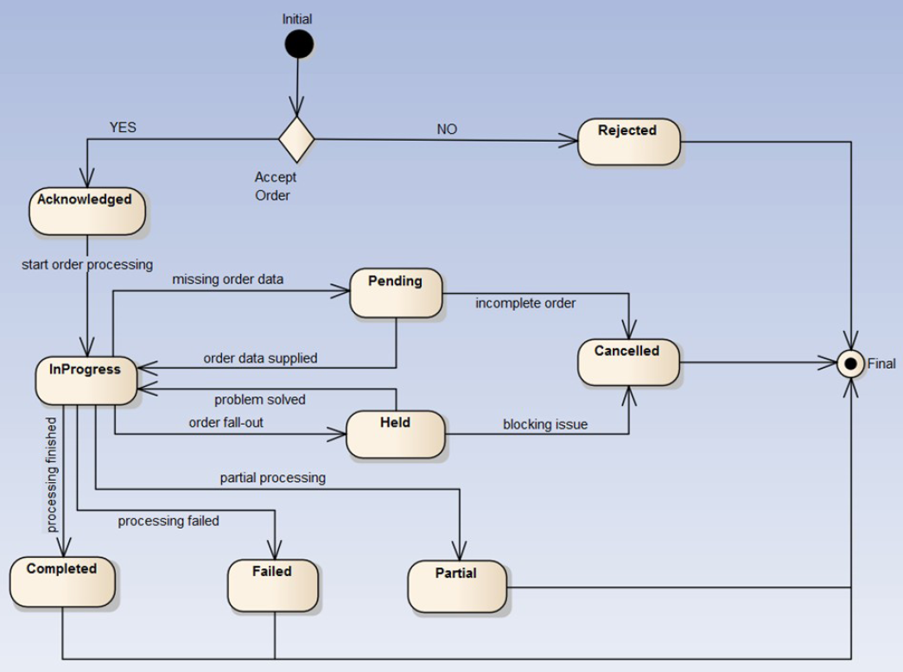
Every node in this state machine corresponds to a BPMN task, where SONATA integrates with other microservices to conduct the necessary operations for the service order to complete.
API
Configured Kafka Channels
| Kafka Channel | Application Producer | Application Consumer | Application Actions |
|---|---|---|---|
| sonata-service-order | TMF API | SONATA | Orchestrates Service Order |
| sonata-service-update | TMF API | SONATA | Orchestrates Service Update |
| sonata-kubernetes-service-update | TMF API | SONATA | Orchestrates Kubernetes Service Update |
| sonata-5g-service-update | TMF API | SONATA | Orchestrates 5G Service Update |
| sonata-register-kubernetes | TMF API | SONATA | Orchestrates Standalone Kubernetes Registration |
| tmf-end-user-service-termination | TMF API | SONATA | Orchestrates End User Service Termination |
| tmf-kubernetes-service-termination | TMF API | SONATA | Orchestrates Kubernetes Termination |
| tmf-five-g-service-termination | TMF API | SONATA | Orchestrates 5G Termination |
| tmf-service-order-activation | TMF API | SONATA | Orchestrates End User Service Scheduler Activation |
| tmf-service-activation | TMF API | SONATA | Orchestrates End User Service Activation |
| tmf-process-info | SONATA | TMF API | Stores Basic SONATA Process Info |
| tmf-delete-process-info | SONATA | TMF API | Deletes Basic SONATA Process Info |
| sonata-cancel-process | TMF API | SONATA | Cancels a Process based on its id and type |
| tmf-service-order-item-update | SONATA | TMF API | Updates Service Order Item and Service Order State |
| tmf-service-update | SONATA | TMF API | Updates Service State and Characteristics |
| tmf-service-dashboard-update | SONATA | TMF API | Updates a Service with Grafana Dashboard URL Info |
| tmf-service-dashboard-delete | SONATA | TMF API | Deletes Grafana Dashboard URL Info from a Service |
| telemetry-create-prometheus-job-and-grafana-dashboard | SONATA | Telemetry API | Creates Prometheus Metrics and Grafana Dashboard for End User Service |
| sonata-service-dashboard-result | Telemetry API | SONATA | Result Message for End User Service: Prometheus Metrics and Grafana Dashboard. Completes the SONATA subrpocess |
| telemetry-platform-service | SONATA | Telemetry API | Telemetry for Kubernetes Service |
| telemetry-platform-service-result | Telemetry API | SONATA | Result message for Kubernetes Service Telemetry |
| telemetry-delete-prometheus-job-and-grafana-dashboard | SONATA | Telemetry API | Deletes Prometheus Metrics and Grafana Dashboard for End User Service : Completes the SONATA subrpocess |
| sonata-service-delete-dashboard-result | Telemetry API | SONATA | Result messsage for Deletion of Prometheus Metrics and Grafana Dashboard |
| helm-engine-parse | SONATA | Package Manager | Reads and validates the Helm Chart from the provided repository info |
| helm-engine-parse-result | Package Manager | SONATA | Result message of the Helm Parse Operation: Completes the SONATA subrpocess |
| helm-engine-deploy | SONATA | Package Manager | Deploys the application via the helm chart and cluster info provided |
| helm-engine-deploy-result | Package Manager | SONATA | Result message of the Helm Deploy Operation: Completes the SONATA subprocess |
| helm-engine-activation | SONATA | Package Manager | Triggers the activation of the end user application |
| helm-engine-activation-result | Package Manager | SONATA | Result message of the Helm End User Service Activation Operation: Completes the SONATA subprocess |
| helm-engine-termination | SONATA | Package Manager | Triggers the termination of the end user application |
| helm-engine-termination-result | Package Manager | SONATA | Result message of the Helm End User Service Activation Operation: Completes the SONATA subprocess |
| oss-client-k8s-order | SONATA | OSS Client | Sends a kubernetes service order to the underlying OSS |
| oss-client-k8s-configuration | OSS Client | SONATA | The result message contains the kubeConfig for the respective kubernetes creates. Completes the SONATA subprocess |
| oss-client-platform-service-update | SONATA | OSS Client | Updates the service in the underlying OSS via the service characteristics provided |
| oss-client-platform-service-update-result | OSS Client | SONATA | Result message for OSS service updates. Completes the corresponding SONATA subprocess |
| oss-client-5g-order | SONATA | OSS Client | Sends a 5G service order to the underlying OSS |
| oss-client-5g-order-result | OSS Client | SONATA | Result message for the 5G service order flow. Completes the SONATA subprocess |
| oss-client-service-termination | OSS Client | OSS Client | Terminates the underlying OSS service |
| oss-client-service-termination-result | OSS Client | SONATA | Result message of the OSS service termination. Completes the SONATA subprocess |
| fabric-api-connection | SONATA | Fabric API | Initiates the Domain Connection Creation flow for the kubernetes host address and ports provided |
| fabric-api-connection-result | Fabric API | SONATA | Result message of the Domain Connection Creation flow. Completes the SONATA subprocess |
| fabric-api-connection-teardown | SONATA | Fabric API | Initiates the Domain Connection Deletion flow for the kubernetes service provided |
| fabric-api-connection-teardown-result | Fabric API | SONATA | Result message of the Domain Connection Deletion flow. Completes the SONATA subprocess |
| registry-store-kubernetes-config | SONATA | Registry API | Operation to store the kubeConfig to Vault Registry. the key is the TMF Kubernetes Service ID |
| registry-store-kubernetes-config-result | Registry API | SONATA | Result message . Completes the SONATA subprocess |
Service Order Process
This process is the main handler of a service order created by the TMF API. Every time a TMF Service Order message is posted in the Kafka topic sonata-service-order an instance of this process is generated. By the message content SONATA is able to determine the next steps of the flow and complete the order. In the following, we will summarize the three main cases that this process handles, noting that SONATA can orchestrate any combination of the following. A sample message is provided below:
{
  "specversion": "1.0",
  "id": "21000e26-31eb-43e7-8343-88a696fd96b1",
  "source": "",
  "type": "sonata-service-order",
  "data": {
    "serviceOrderEndUserData": {
      "serviceOrderId": "2c4fecbc-c436-4f8c-a5db-4a1159ebad2a",
      "serviceOrderItemId": "4e0abab6-25d4-4204-b6e1-aea09f642d49",
      "serviceId": "790daa4d-7f56-4575-8b64-c558cf518bed",
      "serviceName": "CMS",
      "servicePackageManager": "HELM",
      "serviceRepositoryURL": "someUrl",
      "serviceArtifactIdentifier": "react-nginx/compose.yaml",
      "serviceArtifactVersion": "1.0.0",
      "requestedCompletionDate": "2048-02-13T11:27:56.705567622Z"
    },
    "k8sServiceOrderData": {
      "serviceOrderId": "2c4fecbc-c436-4f8c-a5db-4a1159ebad2a",
      "serviceId": "790daa4d-7f56-4575-8b64-c558cf518bed",
      "serviceSpecificationName": "K8SAAS",
      "serviceOrderItemId": "1e382e63-0bac-40fa-a62e-a6c533cecc26",
      "serviceOrderCharacteristics": [
        {
          "characteristicName": "Number of worker nodes",
          "characteristicType": "TEXT",
          "values": [
            {
              "value": "3",
              "alias": null
            }
          ]
        },
        {
          "characteristicName": "Flavor of Nodes",
          "characteristicType": "ENUM",
          "values": [
            {
              "value": "cpu4.m8192.d20g",
              "alias": null
            }
          ]
        }
      ],
      "organizationCharacteristics": {
        "organizationId": "2582308c-9f26-497e-9547-ec88d60ef9ff",
        "organizationName": "osl",
        "characteristics": {
          "EXTERNAL_TMF_API_USERNAME": "username",
          "EXTERNAL_TMF_API_BASE_URL": "192.168.5.160:80",
          "EXTERNAL_TMF_API_OAUTH2_CLIENT_SECRET": "secret",
          "EXTERNAL_TMF_API_PASSWORD": "udududu",
          "EXTERNAL_TMF_API_OAUTH2_TOKEN_URI": "",
          "EXTERNAL_TMF_API_SERVICE_CATEGORY_URL": "/tmf-api/serviceCatalogManagement/v4/serviceCategory",
          "EXTERNAL_TMF_API_CLIENT_REGISTRATION_ID": "1234",
          "PEERED_ORGANIZATION": "true",
          "EXTERNAL_TMF_API_SERVICE_CATALOG_URL": "/tmf-api/serviceCatalogManagement/v4/serviceSpecification?type=CustomerFacingServiceSpecification",
          "EXTERNAL_TMF_API_OAUTH2_SCOPES": "",
          "EXTERNAL_TMF_API_OAUTH2_CLIENT_ID": "123"
        }
      }
    },
    "fiveGServiceOrderData": {
      "serviceOrderId": "2c4fecbc-c436-4f8c-a5db-4a1159ebad2a",
      "serviceId": "790daa4d-7f56-4575-8b64-c558cf518bed",
      "serviceOrderItemId": "90e45010-4c2d-4036-abc3-8c6245098eb3",
      "serviceSpecificationName": "5GAAS",
      "serviceOrderCharacteristics": [
        {
          "characteristicName": "open5gs-core_ns@OSM TEN::TAC",
          "characteristicType": "TEXT",
          "values": [
            {
              "value": "100",
              "alias": null
            }
          ]
        },
        {
          "characteristicName": "open5gs-core_ns@OSM TEN::5G Radio Nodes",
          "characteristicType": "SET",
          "values": [
            {
              "value": "east_agent",
              "alias": "Museum East"
            }
          ]
        },
        {
          "characteristicName": "open5gs-core_ns@OSM TEN::RAN Profile",
          "characteristicType": "ENUM",
          "values": [
            {
              "value": "2",
              "alias": "Maximum DL"
            }
          ]
        },
        {
          "characteristicName": "open5gs-core_ns@OSM TEN::MNC",
          "characteristicType": "TEXT",
          "values": [
            {
              "value": "01",
              "alias": null
            }
          ]
        },
        {
          "characteristicName": "open5gs-core_ns@OSM TEN::MCC",
          "characteristicType": "TEXT",
          "values": [
            {
              "value": "001",
              "alias": null
            }
          ]
        }
      ],
      "organizationCharacteristics": {
        "organizationId": "2582308c-9f26-497e-9547-ec88d60ef9ff",
        "organizationName": "osl",
        "characteristics": {
          "EXTERNAL_TMF_API_USERNAME": "username",
          "EXTERNAL_TMF_API_BASE_URL": "192.168.5.160:80",
          "EXTERNAL_TMF_API_OAUTH2_CLIENT_SECRET": "secret",
          "EXTERNAL_TMF_API_PASSWORD": "udududu",
          "EXTERNAL_TMF_API_OAUTH2_TOKEN_URI": "",
          "EXTERNAL_TMF_API_SERVICE_CATEGORY_URL": "/tmf-api/serviceCatalogManagement/v4/serviceCategory",
          "EXTERNAL_TMF_API_CLIENT_REGISTRATION_ID": "1234",
          "PEERED_ORGANIZATION": "true",
          "EXTERNAL_TMF_API_SERVICE_CATALOG_URL": "/tmf-api/serviceCatalogManagement/v4/serviceSpecification?type=CustomerFacingServiceSpecification",
          "EXTERNAL_TMF_API_OAUTH2_SCOPES": "",
          "EXTERNAL_TMF_API_OAUTH2_CLIENT_ID": "123"
        }
      }
    }
  }
}
The fields serviceOrderEndUserData, k8sServiceOrderData, fiveGServiceOrderData are optional. Each one of them triggers a different orchestration which are summarized below.
Kubernetes Service Order
If the message contains Kubernetes service order info then k8sServiceOrderProcess subprocess instance is created and the following are executed in the order presented below:
- SONATA posts a message to the topic tmf-service-order-item-update with state IN_PROGRESS. This will trigger the corresponding service order/service order item update to TMF-API
- An ossClientOrderK8saasProcess subprocess instance is created. SONATA posts a message to the Kafka topic oss-client-k8s-order.
- Upon success, OSS Client application posts a callback message to the Kafka topic oss-client-k8s-configuration which also includes the kubeConfig in base64 form. This completes the subprocess flow.
- A fabricApiServiceConnection subprocess instance is created. SONATA posts a message to the Kafka topic fabric-api-connection.
- Upon successful domain connection, Fabric API posts a callback message in the Kafka topic fabric-api-connection-result. This completes the subprocess flow.
- registryStoreKubernetesInfoProcess subprocess info is created. SONATA posts a message to the Kafka topic registry-store-kubernetes-config.
- Upon success, Registry API has stored the kubeConfig and sends a callback message in the Kafka topic registry-store-kubernetes-config-result. This completes the subprocess flow.
- A serviceTelemetryPlatformService subprocess instance is created. SONATA posts a message to the Kafka topic telemetry-platform-service.
- Telemetry API will enable basic telemetry for the kubernetes service and post a callback message to the telemetry-platform-service-result.
- SONATA will trigger a k8sServiceTerminationSubprocess subprocess instance which will handle the scheduled termination of the Kubernetes Service according to the requestedCompletionDate provided by the TMF-API.
- SONATA posts a message to the topic tmf-service-update with state ACTIVE. This will trigger the corresponding service update to TMF-API.
- SONATA posts a message to the topic tmf-service-order-item-update with state COMPLETED. This will trigger the corresponding service order/service order item update to TMF-API.
End User Service Order
Here we summarize how SONATA handles the end user Service Order. Step 1 is always executed immediately while the rest are executed depending on the provided requestedStartDate field in the incoming message. SONATA has the ability to schedule the rest via timed jobs. It is important to note that the user through a TMF API Service Order is able to determine the deployment through an existing Kubernetes service or order a new Kubernetes Service in the same order. In the latter case the deployment will be performed in the new one.
- A helmEngineParseRegistryProcess subprocess instance is created. SONATA posts a message to the Kafka topic helm-engine-parse.
- Package Manager application reads the message, checks if the helm chart is reachable in the repository, validates it and stores the chart via a Registry API call. Upon success, it sends a callback message to the Kafka topic helm-engine-parse-result. This completes the helmEngineParseRegistryProcess subprocess.
- SONATA posts a message to the topic tmf-service-order-item-update with state IN_PROGRESS. This will trigger the corresponding service order/service order item update to TMF-API
- A helmEngineDeploymentProcess subprocess instance is created. SONATA posts a message to the Kafka topic helm-engine-deploy. Package Manager application reads the message, selects the correct helm chart for the deployment sends a callback message to the Kafka topic and the correct kubernetes config via the information provided by SONATA and installs the application. Upon success a callback message is posted in helm-engine-deploy-result
- A serviceTelemetryProcess subprocess instance is created. SONATA posts a message to the Kafka topic telemetry-create-prometheus-job-and-grafana-dashboard.
- Telemetry API reads the message and performs the necessary actions to create Prometheus metrics and Grafana dashboard. Upon success, Telemetry API sends a callback message in the Kafka topic sonata-service-dashboard-result. SONATA then posts a message to the KAFKA topic tmf-service-dashboard-update in order to provide to TMF-API the service info for the Grafana dashboard url.bThis completes the subprocess flow.
- SONATA will trigger an endUserServiceTerminationSubprocess subprocess instance which will handle the scheduled termination of the end user Service according to the requestedCompletionDate provided by the TMF-API.
- If the user has provided a future timestamp for requestedStartDate via the TMF API Service Order, SONATA will trigger an serviceOrderServiceActivation subprocess instance which will handle the scheduled activation of the end user Service.
- SONATA posts a message to the topic tmf-service-update with state ACTIVE upon the activation. This will trigger the corresponding service update to TMF-API
- SONATA posts a message to the topic tmf-service-order-item-update with state COMPLETED. This will trigger the corresponding service order/service order item update to TMF-API
5G Service Order
If the message contains Kubernetes service order info then fiveGServiceOrderProcess subprocess instance is created and the following are executed in the order presented below:
- SONATA posts a message to the topic tmf-service-order-item-update with state IN_PROGRESS. This will trigger the corresponding service order/service order item update to TMF-API
- An ossClientOrder5GaasProcess subprocess instance is created. SONATA posts a message to the Kafka topic oss-client-5g-order.
- Upon success, Oss Client application posts a callback message to the Kafka topic oss-client-5g-order-result which completes the subprocess flow.
- A serviceTelemetryPlatformService subprocess instance is created. SONATA posts a message to the Kafka topic telemetry-platform-service. Telemetry API will enable basic telemetry for the kubernetes service and post a callback message to the telemetry-platform-service-result
- SONATA posts a message to the topic tmf-service-update with state ACTIVE. This will trigger the corresponding service update to TMF-API
- SONATA posts a message to the topic tmf-service-order-item-update with state COMPLETED. This will trigger the corresponding service order/service order item update to TMF-API
Service Update Flow
In addition to orchestrating Service Orders, SONATA can also handle specific service update requests. Below we summarize some basic flows.
End User Service Update
In this use case SONATA receives an update message for the end user service packaged as a Helm Chart. Below is a message sample:
{
    "specversion":"1.0",
    "id":"21000e26-31eb-43e7-8343-88a696fd96b1",
    "source":"",
    "type":"sonata-service-update",
    "data":{
        "serviceOrderEndUserData":{
            "serviceOrderId":"2c4fecbc-c436-4f8c-a5db-4a1159ebad2a",
            "serviceOrderItemId":"4e0abab6-25d4-4204-b6e1-aea09f642d49",
            "serviceId":"790daa4d-7f56-4575-8b64-c558cf518bed",
            "k8sServiceId" : "2f1d01c8-80f6-420a-b7d1-a2aa681bde1d",
            "serviceName":"CMS",
            "servicePackageManager":"HELM",
            "serviceRepositoryURL":"someUrl",
            "serviceArtifactIdentifier":"react-nginx/compose.yaml",
            "serviceArtifactVersion":"1.0.0",
            "requestedCompletionDate":"2048-02-13T11:27:56.705567622Z"
        }
    }
}
The fields serviceName, serviceRepositoryURL, serviceArtifactVersion provide the Helm Chart info. Any change in those three will point to a different Helm chart and Package Manager will handle the redeployment.
The field k8sServiceId determines the Kubernetes cluster that will be used for the end user service deployment. Package Manager supports the update of this field, meaning that if a change occurs it will uninstall the previous Helm chart from the previous cluster and install it in the new one.
When a message like that is posted in the Kafka topic sonata-service-update the following will occur:
- A serviceUpdateProcess process instance will be created.
- A helmEngineParseRegistryProcess subprocess instance is created. SONATA posts a message to the Kafka topic helm-engine-parse.
- Package Manager application reads the message, checks if the helm chart is reachable in the repository, validates it and stores the chart via a Registry API call. Upon success, it sends a callback message to the Kafka topic helm-engine-parse-result. This completes the helmEngineParseRegistryProcess subprocess.
- A helmEngineDeploymentProcess subprocess instance is created. SONATA posts a message to the Kafka topic helm-engine-deploy.
- Package Manager application reads the message, selects the correct helm chart for the deployment sends a callback message to the Kafka topic and the correct kubernetes config via the information provided by SONATA and installs the application. Upon success a callback message is posted in helm-engine-deploy-result.
- SONATA posts a message to the topic tmf-service-update. This will trigger the corresponding service update to TMF-API
Platform Service Update
This flow orchestrates an update in Services such as Kubernetes and 5G that were ordered by an underlying OSS.
- platformServiceUpdate process instance will be created.
- An ossClientUpdatePlatformService subprocess instance is created. A message to the Kafka topic oss-client-platform-service-update is posted by SONATA.
- OSS Client reads the message, performs the Service Update request toward OSS and publishes a message to the Kafka topic oss-client-platform-service-update-result. This completes the subprocess.
- SONATA posts a message to the topic tmf-service-update. This will trigger the corresponding service update to TMF-API.
Service Termination Flow
Kubernetes Service Termination
The flow is triggered asynchronously by posting a message to the Kafka topic tmf-kubernetes-service-termination. A sample message is provided below.
{
  "id": "8f82748e-eec2-4726-8b7d-a9643fc77a4f",
  "source": "",
  "type": "tmf-kubernetes-service-termination",
  "kogitoprocinstanceid": "ce604c0c-9d80-4712-9286-061fee21236a",
  "specversion": "1.0",
  "data": {
    "serviceTerminationData": {
      "serviceOrderId": "cb791390-10ce-494d-9d37-192bb22c7903",
      "serviceOrderItemId": "74dc5e22-da5e-4cc2-a2af-324bb300c2a0",
      "serviceId": "c04f3d66-5350-49ea-8b31-ff325f149232",
      "organizationCharacteristics" : {
        "organizationName" : "testOrganizationName",
        "characteristics": {
          "EXTERNAL_TMF_API_USERNAME": "admin",
          "EXTERNAL_TMF_API_BASE_URL": "192.168.5.160:80",
          "EXTERNAL_TMF_API_OAUTH2_CLIENT_SECRET": "secret",
          "EXTERNAL_TMF_API_PASSWORD": "udududu",
          "EXTERNAL_TMF_API_OAUTH2_TOKEN_URI": "",
          "EXTERNAL_TMF_API_CLIENT_REGISTRATION_ID": "1234",
          "PEERED_ORGANIZATION": "true",
          "EXTERNAL_TMF_API_OAUTH2_SCOPES": "",
          "EXTERNAL_TMF_API_OAUTH2_CLIENT_ID": "123"
        }
      }
    },
    "requestedTerminationDate": "2024-02-13T11:27:56Z"
  }
}
After this the following occur in SONATA.
- A k8sServiceTerminationProcess process instance is generated.
- SONATA posts a message to the Kafka topic tmf-process-info. This is important for TMF API. If the termination is scheduled in the future, TMF API is able to reschedule the termination by cancelling this process instance and create a new one.
- An ossClientUpdateTerminationDate subprocess instance is created. SONATA posts a message to the Kafka topic oss-client-service-termination topic.
- Oss Client reads the message and send a request to OSS client to update the termination date by using the provided requestedTerminationDate. Upon success it publishes a message to the Kafka topic oss-client-service-termination-result. This completes the subprocess.
- The parent process will check the requestedTerminationDate field. When the time is due, it will create a fabricApiServiceConnectionTeardown subprocess. This process will handle the termination of the fabric connection. A message will be published to the topic fabric-api-connection-teardown.
- Fabric API reads the message, performs the necessary actions and then publishes a message to the topic fabric-api-connection-teardown-result. This completes the subprocess flow.
- SONATA posts a message to the topic tmf-service-update. This will trigger the corresponding service update to TMF-API.
5G Service Termination
The flow is triggered asynchronously by posting a message to the Kafka topic tmf-five-g-service-termination. A sample message is provided below.
{
   "id": "8f82748e-eec2-4726-8b7d-a9643fc77a4f",
   "source": "",
   "type": "tmf-five-g-service-termination",
   "kogitoprocinstanceid": "ce604c0c-9d80-4712-9286-061fee21236a",
   "specversion": "1.0",
   "data": {
      "serviceTerminationData": {
         "serviceOrderId": "cb791390-10ce-494d-9d37-192bb22c7903",
         "serviceOrderItemId": "74dc5e22-da5e-4cc2-a2af-324bb300c2a0",
         "serviceId": "c04f3d66-5350-49ea-8b31-ff325f149232",
         "organizationCharacteristics" : {
            "organizationName" : "testOrganizationName",
            "characteristics": {
               "EXTERNAL_TMF_API_USERNAME": "admin",
               "EXTERNAL_TMF_API_BASE_URL": "192.168.5.160:80",
               "EXTERNAL_TMF_API_OAUTH2_CLIENT_SECRET": "secret",
               "EXTERNAL_TMF_API_PASSWORD": "udududu",
               "EXTERNAL_TMF_API_OAUTH2_TOKEN_URI": "",
               "EXTERNAL_TMF_API_CLIENT_REGISTRATION_ID": "1234",
               "PEERED_ORGANIZATION": "true",
               "EXTERNAL_TMF_API_OAUTH2_SCOPES": "",
               "EXTERNAL_TMF_API_OAUTH2_CLIENT_ID": "123"
            }
         }
      },
      "requestedTerminationDate": "2024-02-13T11:27:56Z"
   }
}
After this the following occur in SONATA.
- A k8sServiceTerminationProcess process instance is generated.
- SONATA posts a message to the Kafka topic tmf-process-info. This is important for TMF API. If the termination is scheduled in the future, TMF API is able to reschedule the termination by cancelling this process instance and create a new one.
- An ossClientUpdateTerminationDate subprocess instance is created. SONATA posts a message to the Kafka topic oss-client-service-termination topic.
- Oss Client reads the message and send a request to OSS client to update the termination date by using the provided requestedTerminationDate. Upon success it publishes a message to the Kafka topic oss-client-service-termination-result. This completes the subprocess.
- SONATA posts a message to the topic tmf-service-update. This will trigger the corresponding service update to TMF-API.
End User Service Activation/Deactivation Flow
End User Service Activation Flow
This flow is created as soon as an end user service is activated, either by a scheduled end user service activation (provided by the requestedStartDate of the initial Service Order) or when the service has its state updated to ACTIVE via TMF API service update.
In the latter case, a message like the following is published to the topic tmf-service-activation.
{
   "id" : "8f82748e-eec2-4726-8b7d-a9643fc77a4f",
   "source" : "",
   "type" : "tmf-service-activation",
   "specversion" : "1.0",
   "data" : {
      "serviceId" : "ecc4345a-2097-4c3b-a40c-a9e791cdccbb",
      "state" : "ACTIVE"
   }
}
In both the scheduled activation and the service update state operation, the following occur.
- A helmEngineActivationSubprocess subprocess instance is created. SONATA publishes a message to the topic helm-engine-activation.
- Package Manager reads the message and activates the corresponding service. Package Manager publishes a callback message in the topic helm-engine-activation-result. SONATA reads the message and completes the subprocess flow.
- A message is published to the topic tmf-service-update in order to inform the TMF API about the update operation.
End User Service Deactivation Flow
This flow is created as soon as an end user service is deactivated, either by a scheduled end user service deactivation (provided by the requestedStartDate of the initial Service Order) or when the service has its state updated to INACTIVE via TMF API service update.
In the latter case, a message like the following is published to the topic tmf-service-activation.
{
   "id" : "8f82748e-eec2-4726-8b7d-a9643fc77a4f",
   "source" : "",
   "type" : "tmf-service-activation",
   "specversion" : "1.0",
   "data" : {
      "serviceId" : "ecc4345a-2097-4c3b-a40c-a9e791cdccbb",
      "state" : "INACTIVE"
   }
}
In both the scheduled activation and the service update state operation, the following occur.
- A helmEngineActivationSubprocess subprocess instance is created. SONATA publishes a message to the topic helm-engine-activation.
- Package Manager reads the message and deactivates the corresponding service. Package Manager publishes a callback message in the topic helm-engine-activation-result. SONATA reads the message and completes the subprocess flow.
- A message is published to the topic tmf-service-update in order to inform the TMF API about the update operation.
Standalone Kubernetes Registration
Many times in practice a user might have an already existing Kubernetes cluster that may want to use for deploying his applications. For supporting this functionality a Kubernetes onboard flow has been developed in HypO ecosystem. SONATA supports this case by a specific process which supports the orchestration of such a cluster.
Standalone Kubernetes Onboard Process
SONATA can accept simple messages such as the following:
{
  "id" : "3ed8ebb2-55d5-47bc-8575-4225b46b9b65",
  "source" : "",
  "type" : "sonata-register-kubernetes",
  "specversion" : "1.0",
  "data" : {
    "serviceId" : "127a0e0f-89d4-42a7-86dd-c6f6150b50d4",
    "kubeConfig" : "Y2x1c3RlcnM6CiAgLSBjbHVzdGVyOgogICAgbmFtZToga3ViZXJuZXRlcw=="
  }
}
when a message such as the above is published in the Kafka channel sonata-register-kubernetes, the following occur:
- A k8sStandaloneProcess process instance is created in SONATA.
- A fabricApiServiceConnection subprocess instance is created. SONATA posts a message to the Kafka topic fabric-api-connection.
- Upon successful domain connection, Fabric API posts a callback message in the Kafka topic fabric-api-connection-result. This completes the subprocess flow.
- registryStoreKubernetesInfoProcess subprocess info is created. SONATA posts a message to the Kafka topic registry-store-kubernetes-config.
- Upon success, Registry API has stored the kubeConfig and sends a callback message in the Kafka topic registry-store-kubernetes-config-result. This completes the subprocess flow.
- SONATA posts a message to the topic tmf-service-update with state ACTIVE. This will trigger the corresponding service update to TMF-API